Table of Contents
A restaurant runs on speed. A customer finishes a meal and wants the bill now. The kitchen needs the order the moment it is placed. A delivery app order arrives on a tablet in the middle of the lunch rush. At the end of the day, the owner wants to know how much was sold, what was wasted and how much tax is due. Without the right billing software, all this happens on paper slips, shouted orders and late night calculations.
A good restaurant billing system, often called a POS, handles all of this in one place. This guide explains what to look for, how the pieces fit together, what affects the cost and how to choose the right system for your restaurant, cafe, cloud kitchen or sweet shop in India.
What Is Restaurant Billing Software and POS
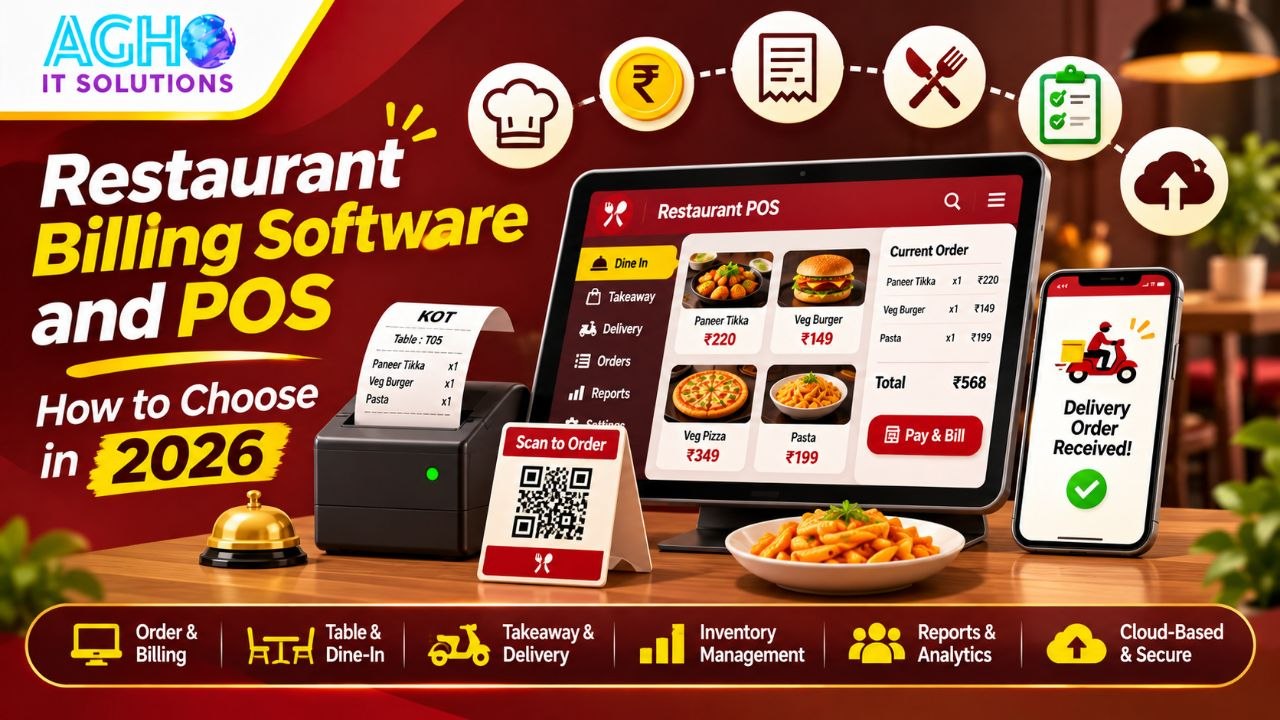
Restaurant billing software creates bills for customers. A POS, or point of sale system, goes further. It connects billing with orders, kitchen tickets, tables, payments, stock and reports. It usually runs on a computer, tablet or phone, and often has a cloud dashboard that the owner can open from anywhere.
Core Features Every Restaurant Should Look For
1. Fast Billing with GST
Quick bill creation for dine in, takeaway and delivery, with tax handled correctly. The system should support the GST setup that applies to your restaurant, produce proper invoices and give reports for filing. GST options for restaurants can differ, so confirm your setup with a chartered accountant.
2. KOT and Kitchen Display
A Kitchen Order Ticket sends each order to the kitchen immediately, as a printed ticket or on a kitchen screen. This removes shouting, lost slips and order mistakes. If you have a bar, tandoor or separate stations, the system should send each item to the right place.
3. Table Management
See which tables are free, occupied or waiting for a bill. Merge or split tables, move orders between tables and split a bill among guests.
4. Multiple Payment Modes
Cash, cards and UPI in a single bill, with part payments and split payments. A dynamic UPI QR on the bill saves time and avoids card machine problems.
5. QR Code Ordering
Guests scan a QR code on the table, view the menu and place orders from their phone, with the order going straight to the KOT. This can cut waiting time and reduce staff load, and it makes updating prices and menu items easy.
6. Online Orders and Delivery Apps
If you receive orders from food delivery apps, the best systems bring those orders into the same POS and kitchen queue as dine in orders, so you do not run separate tablets for each app. Ask whether the integration is official and how it handles menu updates, item availability and payout reconciliation.
7. Your Own Online Ordering
A branded ordering page or WhatsApp ordering lets guests order from you directly, with no commission on every order and with your own customer list as a result. See our guide on the WhatsApp Business app for small businesses.
8. Inventory and Recipe Costing
Track raw material stock, purchases and wastage. With recipe based costing, the system reduces ingredient stock as dishes are sold, so you know your real food cost and when to reorder.
9. Menu and Pricing Management
Create categories, variants, add ons and combos, and update prices across outlets in minutes. Mark items as unavailable when they run out.
10. Customer Records and Loyalty
Save customer details, order history, birthdays and preferences, with permission. Use them to send offers and build repeat visits. See our bulk WhatsApp marketing and bulk SMS marketing services, and use a CRM software if you want a deeper customer system.
11. Staff Management and Access Control
Separate logins for owner, manager, cashier and waiters, with permissions that control who can give discounts, cancel bills or see reports. This protects you from mistakes and misuse.
12. Reports and Dashboard
Daily sales, item wise sales, top and slow dishes, payment mode totals, discount and cancellation reports, staff wise sales and channel wise sales for dine in, takeaway and each delivery app. Good reports show where you make money and where you lose it.
13. Offline Mode
Internet can fail, especially in busy markets. A good POS keeps billing during a short outage and syncs when the connection returns.
14. Multi Outlet Control
If you have several outlets or a cloud kitchen with multiple brands, the system should show all of them in one place, with common menus where needed and separate reports for each outlet.
15. Hardware Support
Check that it works with the printers, scanners, cash drawers and tablets you plan to use.
Dine In, Cafe, Cloud Kitchen and Sweet Shop: Different Needs
- Dine in restaurants: Table management, KOT to multiple stations, split bills, captain app and service charge options.
- Cafes and QSRs: Fast counter billing, token systems, combos and QR ordering.
- Cloud kitchens: Strong delivery app integration, multi brand support, kitchen display and channel wise profit reports.
- Sweet shops and bakeries: Weight based billing, packaged goods with barcodes, advance orders and festival bulk orders.
- Caterers: Quotation and event billing, advance payment tracking and ingredient planning. See our guide on wedding season marketing.
Cloud or Offline Software
Cloud systems store data online, so you can see reports from anywhere and get automatic backup, updates and multi outlet control. Local systems run on one computer and do not depend on the internet for billing. Many modern POS systems combine both, so billing continues during a short outage while data syncs to the cloud. Read our comparison of cloud software versus on premise software.
What Affects the Cost
Prices vary a lot between providers, so compare what you really get. Think about:
- A one time license versus a monthly or yearly subscription.
- Number of outlets, devices and users.
- Modules such as KOT, inventory, CRM, QR ordering and delivery app integration, which may be included or sold separately.
- Hardware such as printers, tablets and scanners.
- Setup, menu creation and staff training.
- Support, updates and data backup.
- Taxes on the software itself, which may be shown separately.
Always ask for a written quotation that lists every item, and check what happens to the price when you add an outlet.
12 Point Checklist Before You Buy
- Does it cover GST billing in the way your restaurant needs?
- Is KOT or kitchen display included, and does it route orders to the right station?
- Does it support table management and split bills?
- Does it accept UPI QR, cards and cash, with split payments?
- Is QR code ordering included or an extra?
- Does it bring delivery app orders into the same screen through an official connection?
- Can you run your own online or WhatsApp ordering?
- Does it have inventory with recipe costing?
- Are there user roles and activity records?
- Does it work offline during an internet outage?
- Are reports clear and easy for you to understand?
- Is there reliable support, training and a live demo?
How to Start Using Your New System
- Step 1: List your menu, prices, taxes and tables, and clean up item names.
- Step 2: Choose your devices, printers and network setup.
- Step 3: Set up user roles, discounts and payment modes.
- Step 4: Train your cashier, captains and kitchen staff, using practice orders.
- Step 5: Run the new system together with your old method for a few days.
- Step 6: Go fully live and check your reports at the end of every day for the first month.
- Step 7: Review food cost, top dishes and wastage every week, and adjust your menu.
Common Mistakes to Avoid
- Choosing only the cheapest software.
- Skipping the demo with your own menu.
- Not training staff before opening day.
- Using separate tablets for each delivery app.
- Giving every staff member full access.
- Not setting up stock and recipes, then having no idea of your real food cost.
- Ignoring backup and offline mode.
- Not checking the report for discounts and cancelled bills.
- Forgetting to confirm your GST setup with a professional.
Market Your Restaurant Too
A good POS helps you run the restaurant. To fill tables, you also need to be found. Keep your Google Business Profile complete, post great food photos, ask for honest reviews and use Instagram regularly. See our guides on Google Business Profile updates, Instagram marketing for small business and winter and New Year marketing ideas, and our social media management, SEO and Meta ads services. For menus and posters, see our poster designing and social media graphics services.
Customer phone numbers and order history are personal data, so keep them safe. Read our DPDP Act compliance checklist.
Restaurant Billing Software from Agho IT Solutions
At Agho IT Solutions in Lucknow, we offer restaurant billing software, where you can also see a live demo, along with ERP billing software, CRM software and website development. Our team can show you the software with your own menu and guide you on setup and training.
Call us on +91-9194046587 or visit us at L-III/77, Sector-D, Aliganj, Lucknow, Uttar Pradesh 226024. You can also contact us online to see a demo.
Frequently Asked Questions
What is the difference between billing software and a POS?
Billing software creates bills. A POS also connects orders, kitchen tickets, tables, payments, stock and reports, so it handles the whole restaurant flow.
Do I need KOT software?
Yes, for most restaurants. It sends orders to the kitchen instantly, reduces mistakes and removes the need for paper slips and shouting.
Can billing software take Swiggy and Zomato orders?
Many systems can bring delivery app orders into the POS. Ask whether the integration is official and how it handles menu updates and payments.
Can I use QR ordering at my tables?
Yes, if your software supports it. Guests scan a QR code, view the menu and place orders from their phone, and the order goes to the kitchen.
Will the software work without internet?
Many modern systems keep billing offline for a short time and sync when the connection returns. Confirm this before you buy.
Is free restaurant billing software enough?
It may work for a very small counter, but you often need paid features for inventory, QR ordering, delivery app integration and multiple outlets. Compare what you need before you decide.
Frequently Asked Questions
Quick answers to common questions about this article and our technology solutions.
01
Technology & Software
Are there any limits on Support?
With valid entitlement, there are no limits on the number of questions, who asks the question, or the topic (as long as it is reasonably related to the product). There is a 16-hour limit on the effort Arm spends on an individual case before requiring a management review of the case.
02
Technology & Software
What is the recruitment and interview process at AGHO IT Solutions?
Our interview process typically includes: 1) Initial profile screening and shortlisting by HR, 2) Technical interview / practical assignment, 3) Cultural and leadership discussion with department heads, and 4) Final offer letter rollout.
03
Technology & Software
Do you serve clients outside Lucknow?
Yes, we serve clients across Uttar Pradesh including Barabanki, Hardoi, Unnao, Sitapur and Raebareli and many more . We also serve international clients in UAE, US and Canada.
04
Technology & Software
Can I apply if my skills match multiple positions?
Yes! You can apply for a specific role or choose "General Application" from the positions dropdown. Our talent acquisition team will evaluate your resume against all active and upcoming openings.
Turn Your Vision Into a Scalable Software Solution
Whether you need Hospital Management Software, Cloud ERP, High-Converting Website, or Mobile App — get free technical architecture consultation with our engineering team.